Types of SDLC
Waterfall Model
- The Waterfall Model is one of the oldest and simplest approaches to the Software Development Life Cycle (SDLC). It follows a linear and sequential process, where each phase depends on the completion of the previous one. Imagine it like water flowing down a set of steps - once you move from one step to the next, you don’t go back up.
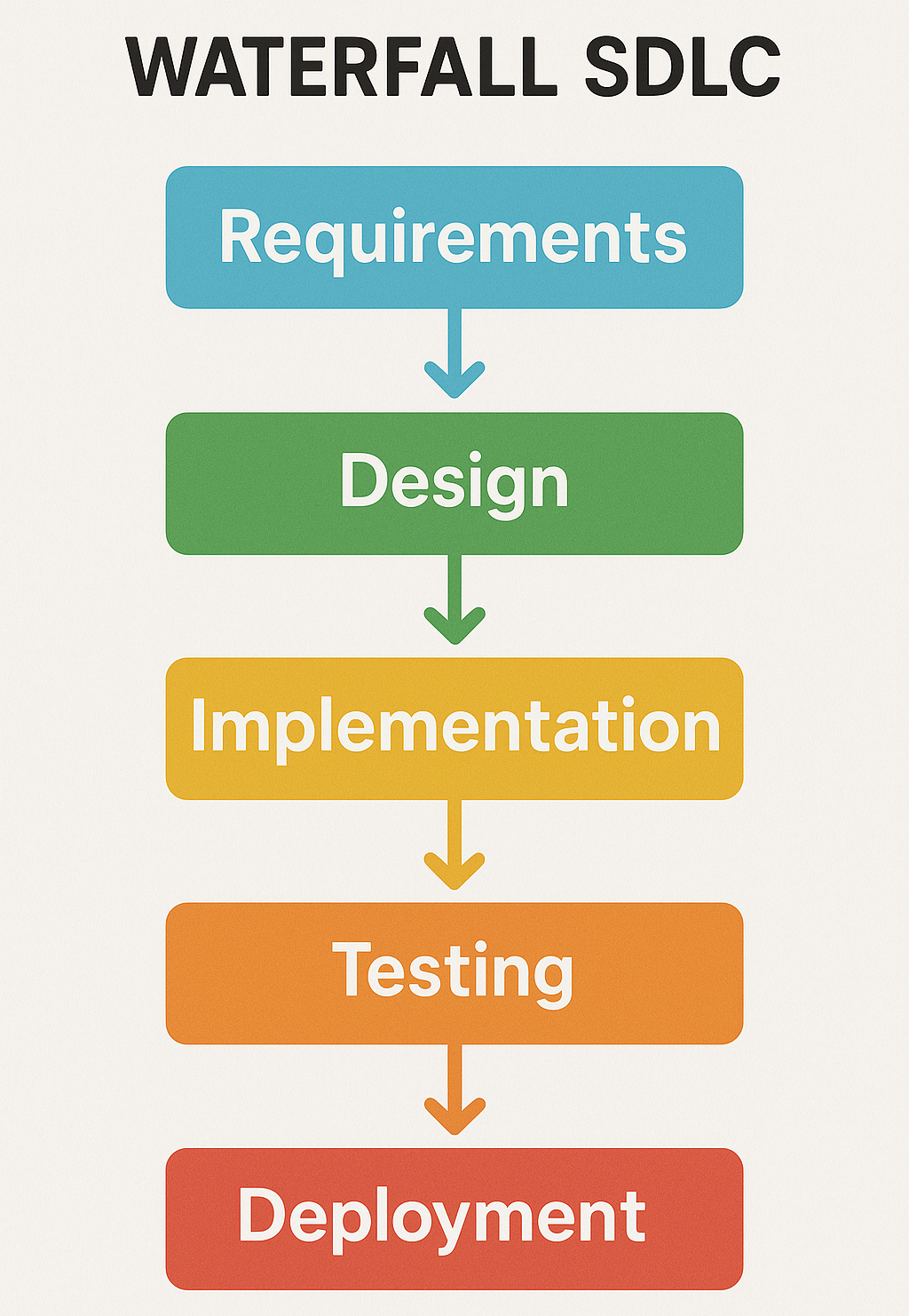
Phases of the Waterfall Model
- Requirements Gathering and Analysis
- Example
- This is the first step where all the requirements for the software are gathered. The focus is on understanding what the software should do.
- For a new shopping website, the requirements might include features like product browsing, shopping carts, and payment processing.
- System Design
- Example
- After gathering requirements, the team creates the design of the software. This includes the system architecture, data flow, and how different parts of the software will interact.
- Designing the layout of the website, how the user interface will look, and how the database will store information like user accounts and product details.
- Implementation (Development)
- Example
- In this phase, developers start coding the software based on the design created earlier. The actual software product is built.
- Developers write the code for the shopping website, creating features like adding products to the cart, managing user profiles, and handling payments.
- Integration and Testing
- Example
- Once the coding is done, the software is tested to find and fix any bugs or errors. The goal is to ensure the software works as expected and meets the requirements.
- Testers use the shopping website to make sure users can browse, add items to the cart, make payments, and that everything works smoothly.
- Deployment
- Example
- After testing, the software is deployed or released to the end users. This phase involves making the software available to customers or users.
- The shopping website is made live for customers to use.
- Maintenance
- Example
- Once the software is live, it enters the maintenance phase where developers fix any issues that arise and make updates as needed.
- If users report a bug where the payment system fails, the developers fix the issue and release an update.
Key Characteristics of the Waterfall Model
-
Sequential: You move from one phase to the next. Once you complete a phase, you don’t go back. For example, after the design phase, you can’t go back to change the requirements.
-
Rigid: Since each phase must be finished before moving to the next, it’s not flexible for changes later in the process.
-
Good for small projects: Waterfall works well for small projects where requirements are clear and unlikely to change.
V-Model (Validation and Verification)
-
The V-Model (also called the Verification and Validation Model) is an extension of the Waterfall Model but focuses more on testing at each phase of the development process. It’s called the V-Model because the process follows a V-shape, where the left side represents development stages (Verification) and the right side represents corresponding testing stages (Validation).
-
In this model, for every phase of development, there is a corresponding testing phase to ensure quality.
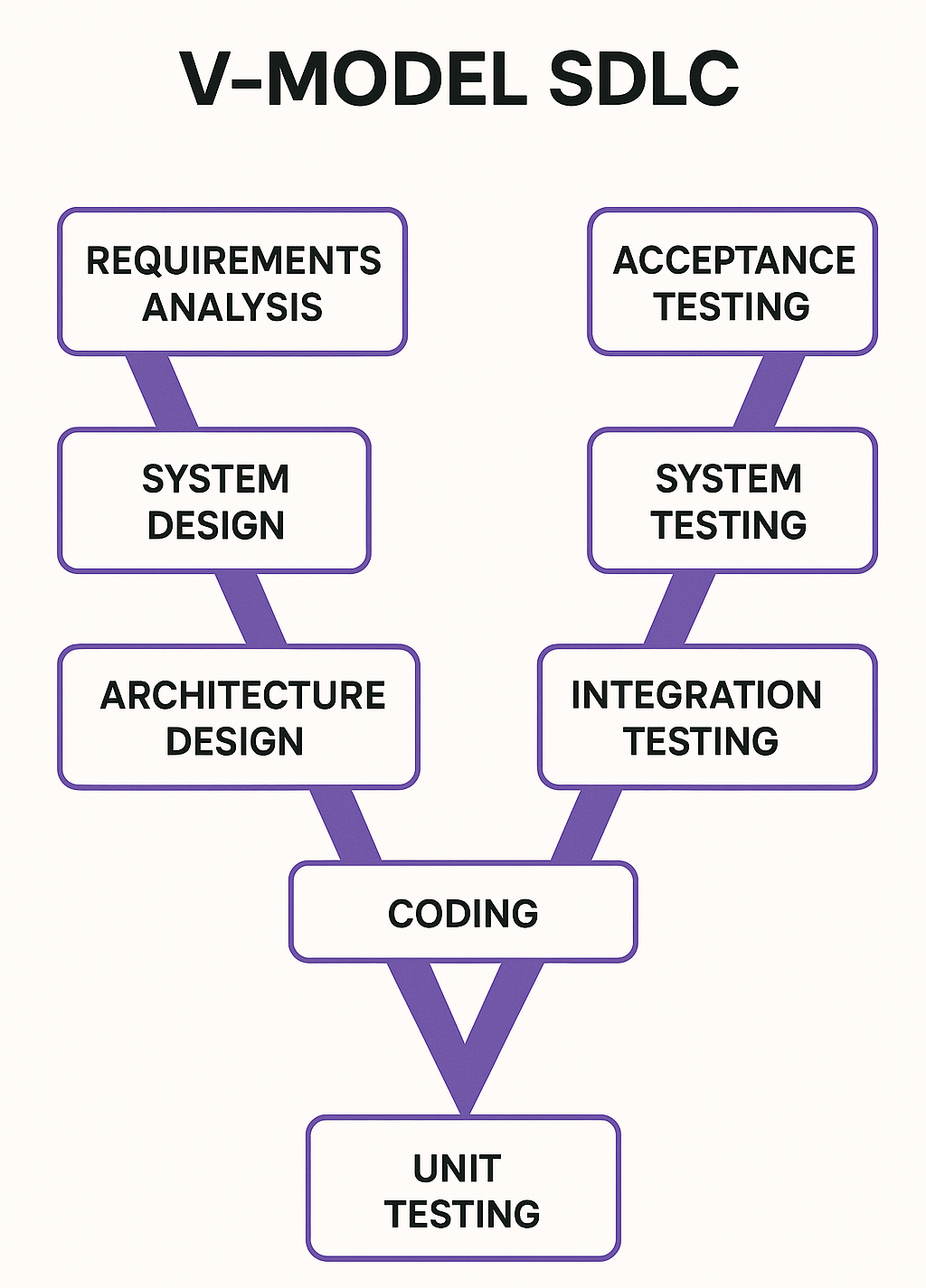
Phases of the V-Model
- Left Side: Verification (Development Phases)
- Right Side: Validation (Testing Phases)
- Verification means "Are we building the product right?" It involves checking that each phase is done according to requirements and plans.
- Requirements Analysis
- Example
- Corresponding Test Phase
- This is where you gather all the requirements for the project, just like in the Waterfall Model.
- Understanding that the shopping website needs features like user login, payment, and product search.
- Acceptance Testing (final testing to ensure the software meets user needs).
- System Design
- Example
- Corresponding Test Phase
- Based on the requirements, the team creates a high-level design or blueprint of how the software will function.
- Deciding how users will navigate the shopping website, how the database will store data, and how different components will interact.
- System Testing (testing the entire system to ensure it works as a whole).
- Architectural Design
- Example
- Corresponding Test Phase
- The system design is broken down into smaller, specific components (like database design, user interface design, etc.).
- Designing specific modules like the login system, shopping cart system, and payment gateway.
- Integration Testing (testing the interaction between different modules or components).
- Module Design
- Example
- Corresponding Test Phase
- Each component or module is designed in detail. This is where individual functions or classes are specified.
- Detailing how the login feature works, what happens when users enter their email and password.
- Component Testing (testing individual modules to ensure they function correctly on their own).
- Implementation
- Example
- Corresponding Test Phase
- The actual development takes place in this phase. Developers write code based on the design.
- Writing the code for the shopping website, implementing features like user registration, product search, and order processing.
- Unit Testing (testing individual units or functions of code to ensure they work correctly).
- Validation means "Are we building the right product?" It checks if the product meets the user's needs and requirements.
- Unit Testing (corresponding to Implementation)
- Example
- Testing individual components or pieces of code to ensure they work correctly.
- Testing just the login module to make sure it accepts valid credentials and rejects invalid ones.
- Component Testing (corresponding to Module Design)
- Example
- Testing individual components or modules to ensure they function correctly.
- Testing the shopping cart module independently to verify that items can be added and removed.
- Integration Testing (corresponding to Architectural Design)
- Example
- Testing how different modules or components work together as a system.
- Testing the integration between the shopping cart and the payment system to ensure they work smoothly together.
- System Testing (corresponding to System Design)
- Example
- Testing the entire system to ensure all parts work together and the software behaves as expected.
- Testing the whole shopping website to ensure all features - like browsing products, making payments, and viewing orders - work correctly.
- Acceptance Testing (corresponding to Requirements Analysis)
- Example
- Testing to ensure the final product meets the business requirements and is ready for release.
- Ensuring that the shopping website meets customer needs, such as allowing users to make purchases easily and securely.
Key Characteristics of the V-Model
-
Parallel Testing and Development: For every development phase on the left, there’s a corresponding test phase on the right.
-
Early Testing: Testing starts as early as possible, making it easier to find and fix issues early in the process.
-
Clear Structure: Like the Waterfall Model, the V-Model is structured and sequential, but with added focus on testing at each stage.
Iterative and Incremental Model
-
The Iterative and Incremental Model is a flexible approach to software development where the project is broken into smaller parts, and these parts are developed and refined over several cycles or iterations.
-
This model combines two main ideas:
-
Incremental Development: The software is built and delivered in small chunks increments, each adding new features.
-
Iterative Development: Each chunk is repeatedly improved over time through multiple iterations.
-
-
Instead of building the entire software at once, the team builds it piece by piece, with each piece being reviewed and refined after every iteration. Each iteration results in a more complete and improved version of the software.
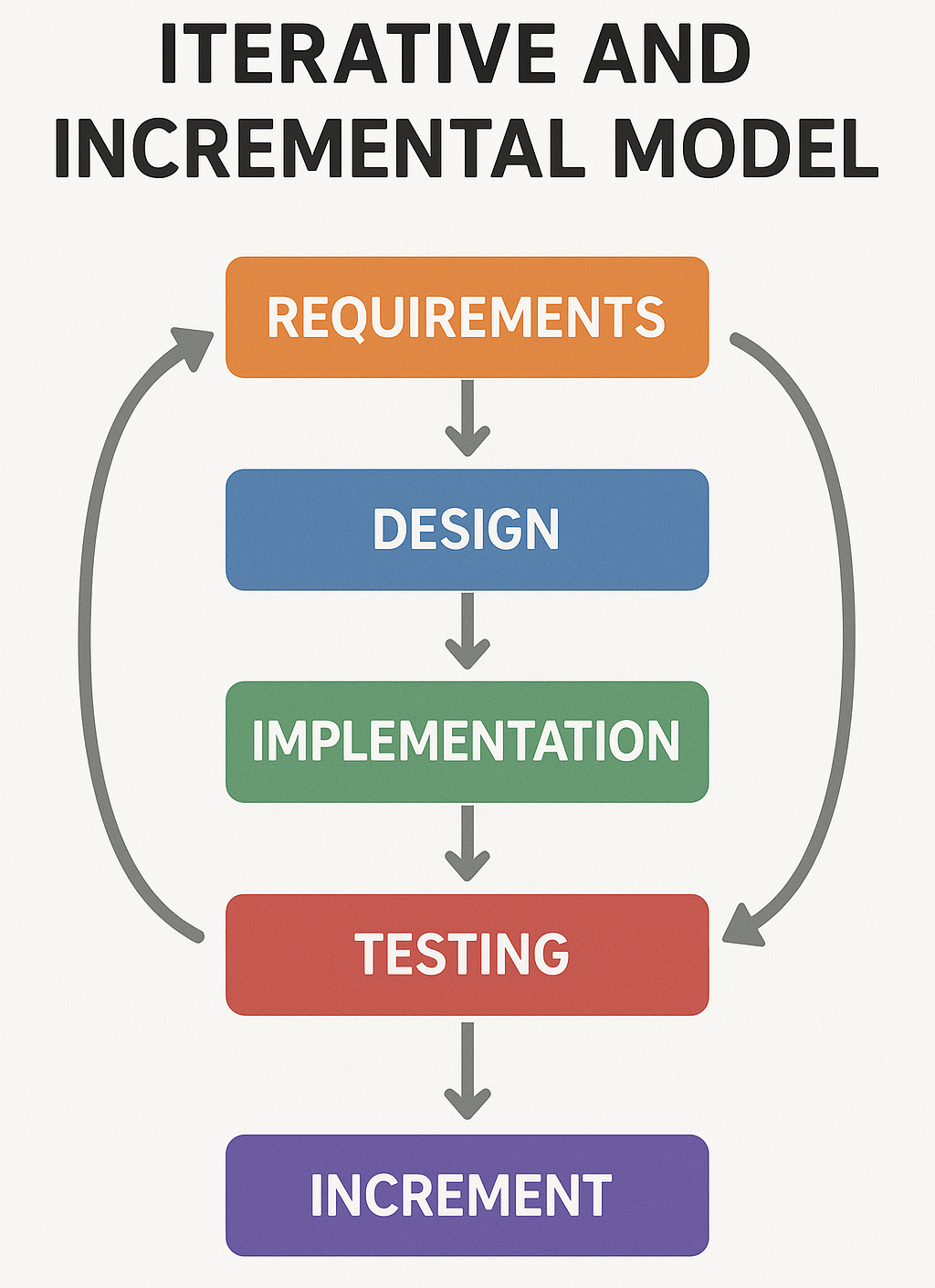
Phases of the Iterative and Incremental Model
- Initial Planning
- Example
- Like other models, the project starts with planning and gathering the basic requirements. However, in this model, not all requirements need to be known upfront.
- For a shopping website, the initial plan might only focus on core features like user registration and product search.
- Design
- Example
- In the first iteration, the team designs a small portion of the software based on the most critical requirements.
- Designing just the registration and login functionality.
- Development
- Example
- The team develops the selected portion of the software during the first iteration.
- Developers build the registration and login system for users to create accounts and log in.
- Testing
- Example
- Once the development for the current iteration is complete, the software is tested to ensure it works as expected.
- Testers check the registration and login features to ensure they work properly.
- Review and Feedback
- Example
- After testing, the team gathers feedback and reviews the work to identify improvements or changes needed for the next iteration.
- Based on feedback, the team might decide to improve the password recovery feature.
- Next Iteration (Repeat Steps)
- Example
- The process is repeated for the next set of features or improvements. Each time, new parts of the software are designed, developed, tested, and reviewed.
- In the next iteration, the Key Characteristics of the Iterative and Incremental Modelteam might add product search and shopping cart functionality.
Key Characteristics of the Iterative and Incremental Model
-
Small and Manageable Pieces: The software is developed incrementally, so it’s easier to manage and test in smaller chunks.
-
Frequent Feedback: Each iteration includes a review and feedback process, allowing the team to make improvements or changes based on user or stakeholder feedback.
-
Improvement Over Time: With each iteration, the software becomes more complete and higher quality. Issues from previous iterations are fixed, and new features are added.
-
Flexible Requirements: Not all requirements need to be defined at the start. The model allows for changes and new requirements as the project progresses.
-
Let’s say you’re building a shopping website. Instead of building the entire site at once, you might follow these steps:
-
First Iteration: Build basic user registration and login features.
- Test and get feedback.
-
Second Iteration: Add product search and browsing functionality.
- Test and get feedback.
-
Third Iteration: Add shopping cart and payment features.
- Test and get feedback.
-
Fourth Iteration: Improve the user interface, fix bugs, and add more advanced features like user reviews or a recommendation system.
-
-
Flexibility: You can change or add new features based on feedback during development.
-
Early Results: Stakeholders can see early versions of the software, which gives them an idea of progress and allows for early corrections.
-
Risk Reduction: Testing happens in every iteration, so issues are caught early before they become big problems.
Spiral Model
-
The Spiral Model is a type of Software Development Life Cycle (SDLC) that combines the Iterative and Waterfall models with a strong focus on risk management. The key idea is that the development process goes through repeated cycles (spirals), where each cycle improves and builds upon the previous one.
-
At the same time, the Spiral Model identifies and addresses potential risks early in each cycle, making it a great choice for large, complex projects with high risk.
-
The Spiral Model has four main phases that are repeated in every cycle or "spiral" of development. Each spiral builds upon the previous one, so the software becomes more complete and refined with every loop.
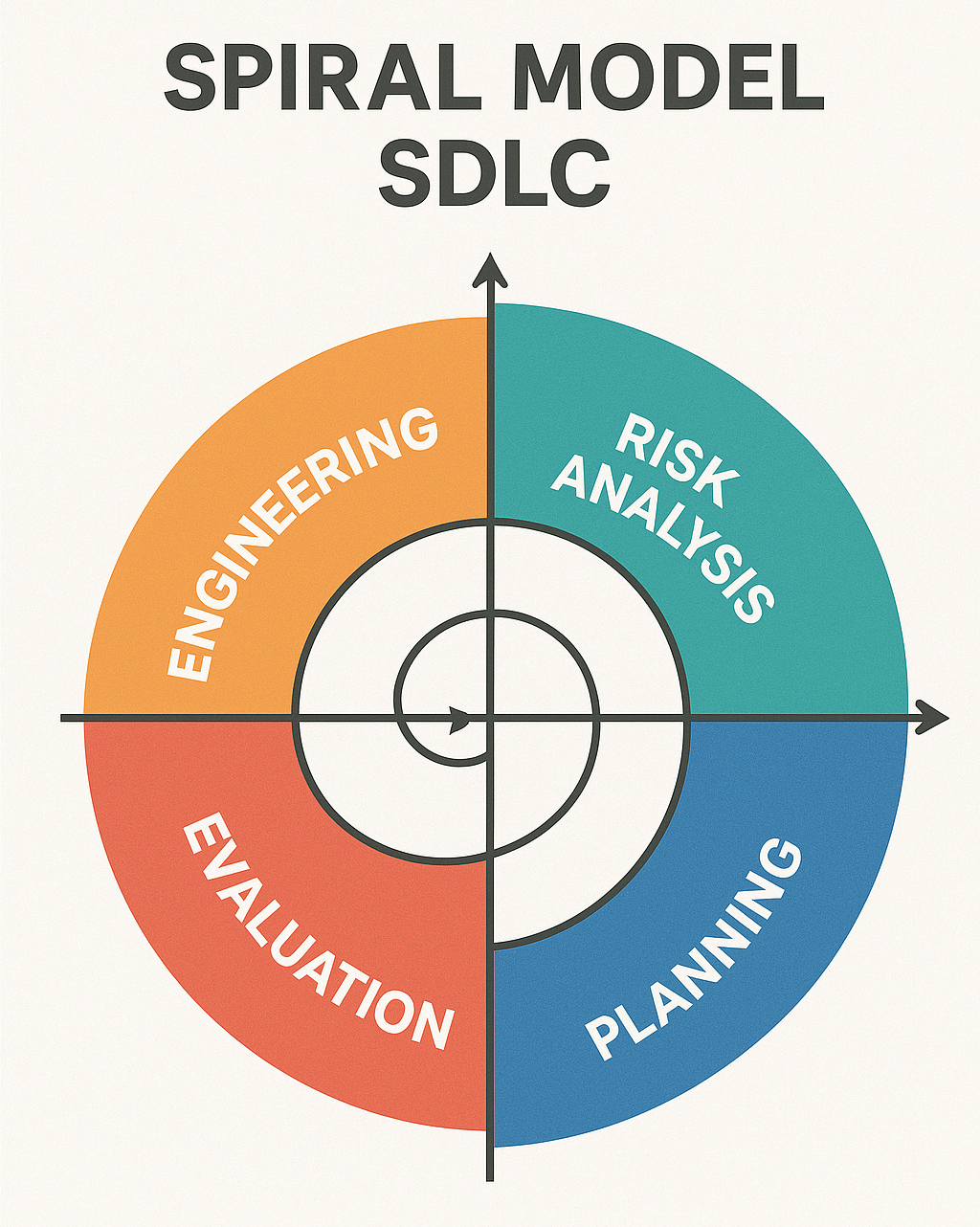
Phases of the Spiral Model
- Planning
- Example
- In the first phase of each spiral, the team gathers requirements and creates a plan for that particular cycle.
- For a shopping website, the team might plan to add product search in the first spiral and focus on the checkout system in the next spiral.
- Risk Analysis
- Example
- Before moving forward, the team performs a risk assessment to identify any potential challenges, risks, or uncertainties in the project. They then plan how to handle these risks.
- If the team is worried about security issues in the payment system, they’ll design safeguards and backup plans to mitigate those risks.
- Development and Testing
- Example
- After analyzing risks, the actual development begins for that particular part of the software, followed by testing to make sure it works as expected.
- Developers build the product search feature and then test it to make sure it returns accurate results and functions smoothly.
- Review and Evaluation
- Example
- Once the development and testing are done, the team reviews the work, gathers feedback, and evaluates whether to move to the next spiral. Based on the results, they plan the next cycle.
- The team reviews the product search feature, gathers feedback from testers or users, and plans the next spiral (such as adding the shopping cart).
Key Characteristics of the Spiral Model
-
Risk Management: The Spiral Model’s unique strength is its focus on identifying and addressing risks at the beginning of each cycle. This helps prevent major issues from emerging later in the project.
-
Iterative: Like the Iterative Model, the software is developed in cycles, with each spiral refining and building on the previous version.
-
Flexible: New features, changes, or improvements can be easily added in future spirals based on feedback and risk assessments.
- Let’s say you’re building a shopping website. Here’s how the Spiral Model might look:
- First Spiral
- Second Spiral
- Third Spiral
Focus on user registration and login.
Planning: The team decides to build the user login and registration system.
Risk Analysis: They identify security as a potential risk and implement encryption for passwords.
Development and Testing: The team builds and tests the login feature.
Review: Feedback shows that users want a "Forgot Password" feature, so they plan to add it in the next spiral.
Focus on product browsing and search.
Planning: The team plans to implement product search.
Risk Analysis: They identify performance as a risk search results might slow down with too many products so they design a fast search algorithm.
Development and Testing: The team builds and tests the search feature.
Review: Feedback is collected, and the next spiral is planned.
Focus on shopping cart and payment.
Planning: The team plans the shopping cart and payment system.
Risk Analysis: Security risks are high for payments, so they implement secure payment gateways and fraud detection.
Development and Testing: The shopping cart and payment system are developed and tested.
Review: The cycle is reviewed, and the software is closer to completion.
-
Risk Reduction: By analyzing risks at every phase, the Spiral Model helps prevent major issues later in the project.
-
Flexibility: New features and improvements can be added in future spirals based on feedback.
-
Early Prototypes: The model allows for early versions of the software (prototypes) to be built and tested, which helps stakeholders understand the product's progress.
-
Large, complex projects: It’s especially useful for projects where risks are high, and requirements might change during development. Risky projects: If a project has a lot of unknowns or technical challenges, the Spiral Model helps address those early on.
-
Projects with feedback loops: If stakeholders want to see early versions and provide feedback throughout development, this model is a good choice.
Agile Model
-
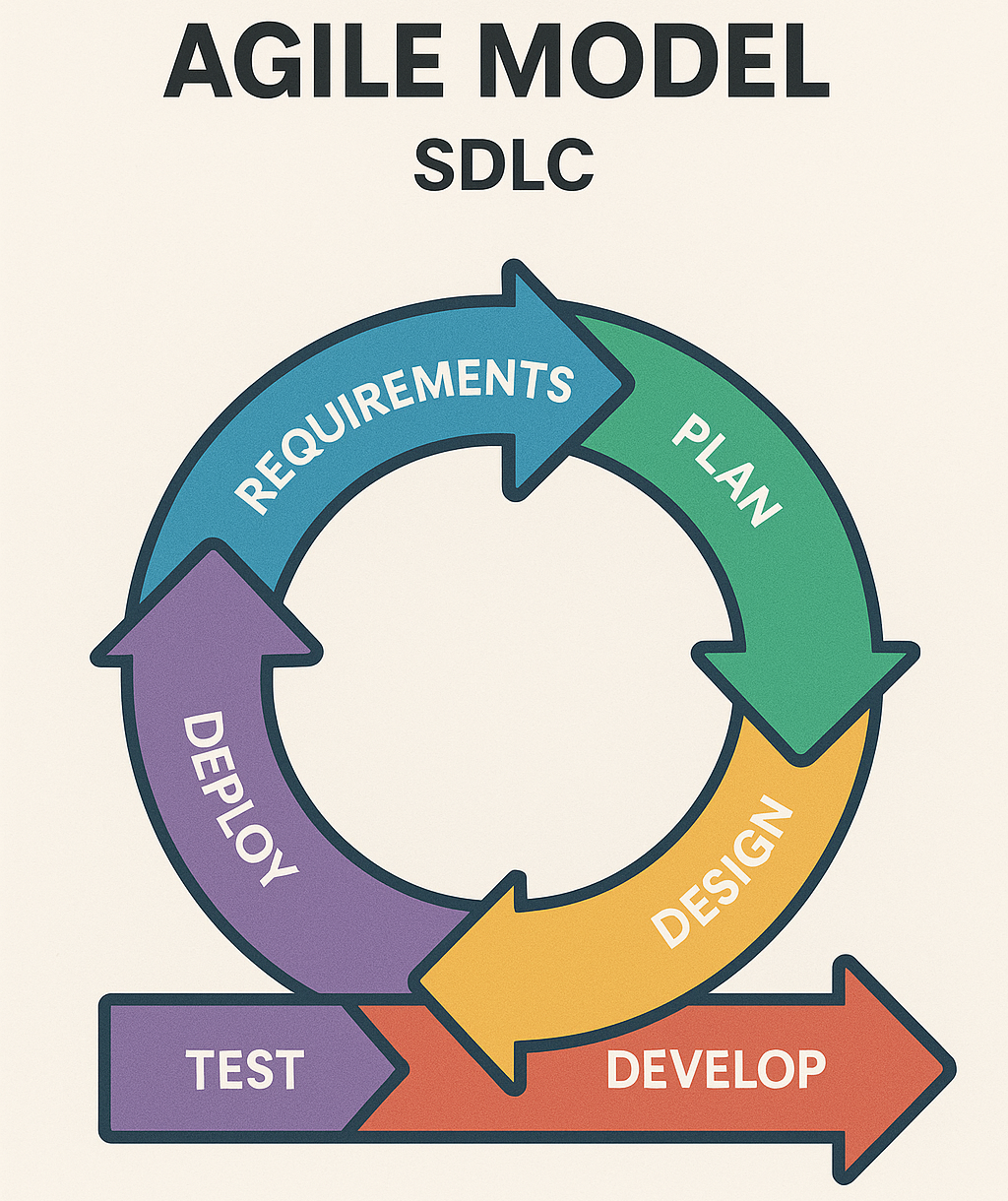
The Software Development Life Cycle (SDLC) is a process used to design, develop, and test high-quality software. The Agile Model is one of the most popular approaches within SDLC that emphasizes flexibility, collaboration, and customer feedback throughout the project.
-
In the Agile Model, software is developed in small, manageable chunks called iterations or sprints, which typically last 1 to 4 weeks. Each sprint delivers a working version of the product with added features, allowing teams to adapt to changes quickly.
Phases of the Agile Model
Requirement Gathering
-
Goal: Understand what the customer needs.
-
The team gathers basic requirements, but instead of finalizing everything upfront, they keep this flexible and open to change as the project progresses.
Planning
-
Goal: Break down the project into small, manageable tasks.
-
The team plans the features to be developed in the upcoming sprint. This involves setting goals and identifying tasks to be completed within the sprint’s timeframe.
Design and Development
-
Goal: Build the features planned for the sprint.
-
The developers design and code the features. This is done in short cycles (sprints), so there’s frequent testing and collaboration among team members.
Testing
-
Goal: Ensure the new features work correctly.
-
After development, the features are tested. In Agile, testing happens continuously throughout the project, so bugs are caught early.
Deployment
-
Goal: Deliver the working software to users.
-
Once the features have been developed and tested, the team deploys them. In Agile, the product can be released more frequently than traditional models, providing faster updates.
Review and Feedback
-
Goal: Get feedback and improve.
-
At the end of each sprint, the team reviews the work done and gathers feedback from the customer or stakeholders. This feedback helps to adjust priorities for the next sprint.
Iteration / Next Sprint
-
Goal: Continuously improve the software.
-
Based on the feedback and evolving requirements, the next sprint begins, and the process repeats until the product is complete.
Key Characteristics of Agile
-
Flexibility: You can change direction based on feedback.
-
Customer Involvement: Customers are involved at every step.
-
Quick Delivery: The product is delivered in small, functional chunks.
-
Continuous Improvement: Regular feedback ensures the product evolves as needed.
DevOps Model
-
The DevOps Model in the Software Development Life Cycle (SDLC) integrates development (Dev) and operations (Ops) teams to work together throughout the software delivery process. The primary goal is to speed up the software release cycle by automating workflows and improving collaboration, ensuring that the code is always in a deployable state.
-
In the DevOps model, the focus is on continuous integration, continuous delivery (CI / CD), and automated monitoring. This allows software to be built, tested, and released faster and more reliably.

Phases of the DevOps Model
Planning
-
Goal: Define the software’s purpose and goals.
-
Both the development and operations teams collaborate on planning. This includes defining project requirements, features, and timelines. The process is iterative, similar to Agile, where plans can be adjusted as feedback comes in.
Development
-
Goal: Write the code for the software.
-
Developers write the code and collaborate closely with the operations team to ensure it will run smoothly in production. In a DevOps environment, developers often use version control systems (like Git) for continuous integration (CI), where small changes to the codebase are frequently merged and tested.
Continuous Integration (CI)
-
Goal: Automatically build and test code frequently.
-
The code is integrated into a shared repository multiple times a day, and automated builds and tests run to catch errors early. This ensures the codebase is always in a deployable state.
Continuous Testing
-
Goal: Continuously test the software for quality.
-
Automated tests are run after every code change to ensure that the new code does not break any existing functionality. This includes unit tests, integration tests, and other quality checks.
Deployment
-
Goal: Automatically deploy the software.
-
Once the code has passed testing, it moves to deployment, often using continuous delivery (CD) pipelines. The software can be deployed to a staging environment for further testing and, once approved, moved to production. In some cases, DevOps teams practice continuous deployment, where every change that passes automated tests is automatically deployed to production.
Monitoring and Logging
-
Goal: Monitor performance and capture data for analysis.
-
Once the software is deployed, it is continuously monitored for performance, security, and user experience. Real-time monitoring tools (like Prometheus or ELK stack) are used to track metrics like uptime, error rates, and usage. Logs are collected for troubleshooting and optimizing performance.
Feedback and Optimization
-
Goal: Improve the product based on user feedback and performance data.
-
Feedback loops between developers, operations, and users help identify issues and opportunities for improvement. This phase feeds into the next iteration of planning and development, making the process continuous.
Key Characteristics of DevOps
-
Faster Time to Market: Automating workflows and improving collaboration between teams allows for quicker and more frequent releases.
-
Improved Quality: Continuous testing and monitoring catch bugs and performance issues early.
-
Increased Collaboration: DevOps breaks down silos between development and operations teams.
-
Greater Efficiency: Automation reduces the need for manual intervention, freeing up time for more strategic work.
-
The DevOps model creates a culture of collaboration and automation to ensure that software is built, tested, and delivered more efficiently. It aligns well with organizations that want to improve the frequency and quality of their releases.
-
Some common tools used in DevOps include:
-
Version Control (Git, GitLab)
-
CI / CD (Jenkins, CircleCI)
-
Configuration Management (Ansible, Chef, Puppet)
-
Containerization (Docker, Kubernetes)
-
Monitoring (Nagios, Prometheus)
-
Big Bang Model
-
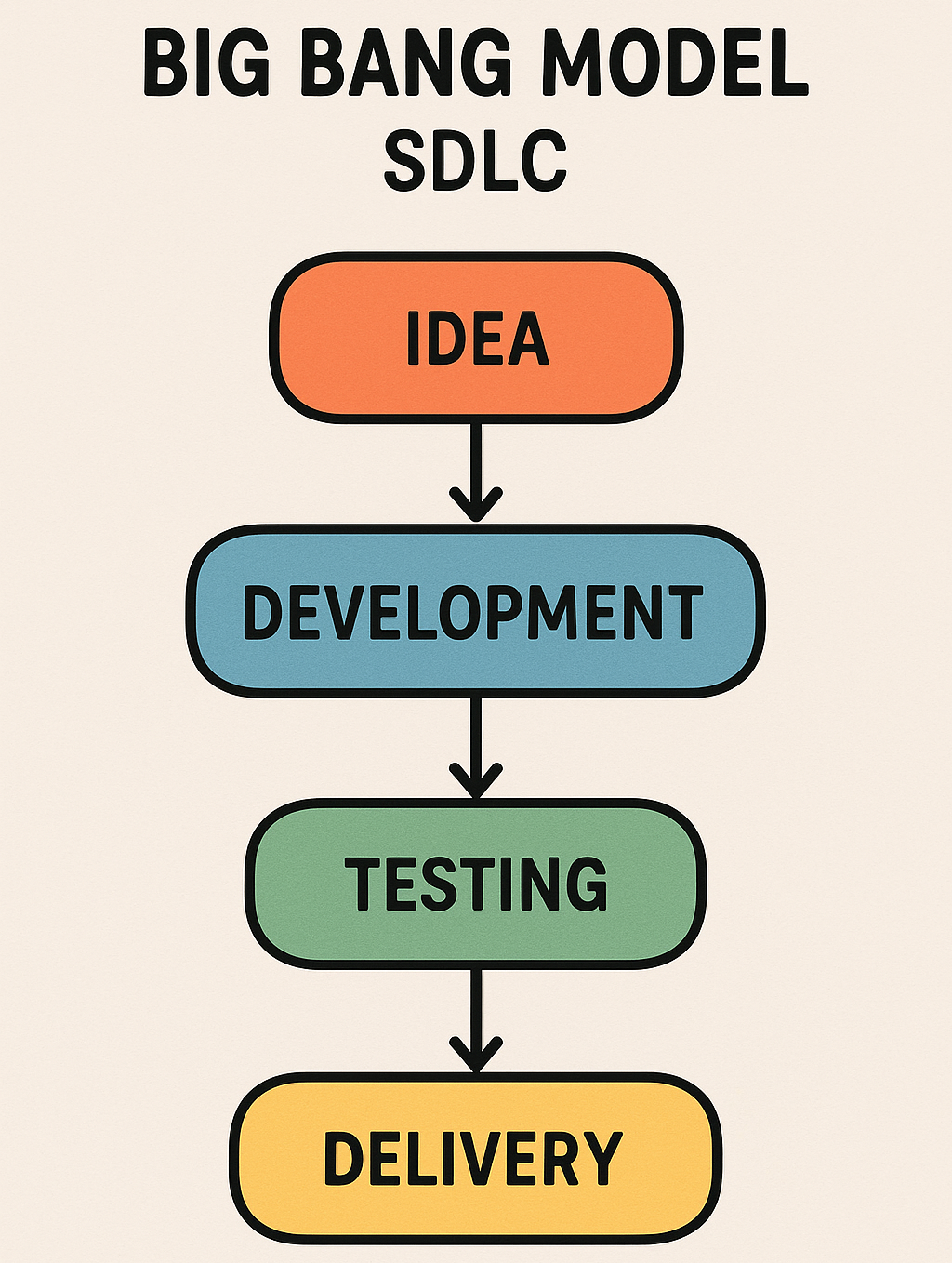
The Big Bang Model in Software Development Life Cycle (SDLC) is a less structured and simple approach to developing software. It is typically used for small projects or projects where the requirements are unclear or rapidly changing. In the Big Bang Model, there is minimal planning, and most of the focus is on coding and development.
-
The Big Bang Model essentially involves throwing together resources like time, effort, and money into development, often without clear understanding or structured phases. The outcome is usually unpredictable, and the project may succeed or fail based on how well the team adapts.
Phases of the Big Bang Model
Requirements Gathering (Optional or Minimal)
-
Goal: Understand the basic concept or idea of the software.
-
In the Big Bang Model, requirements may not be fully gathered or documented. The development starts without a clear idea of what the final product should look like. Requirements might come up as the project progresses.
Design (Optional or Minimal)
-
Goal: Sketch out a rough idea of the solution.
-
Unlike other SDLC models where design is carefully planned, in the Big Bang Model, design might be minimal or non-existent. Sometimes, developers skip the design phase and jump straight into coding based on initial ideas.
Development
-
Goal: Write the code and implement the solution.
-
Most of the focus is on coding. Developers start building the product without fully knowing the scope or potential challenges. Changes in the codebase often happen spontaneously as the project evolves.
Testing
-
Goal: Test the product to see if it works.
-
Testing in the Big Bang Model may be delayed until a large portion of the project is developed, or it might happen as an afterthought. Since there is little to no planning, bugs and issues might be frequent and difficult to resolve.
Deployment
-
Goal: Release the product.
-
Once the product is built and minimally tested, it can be released. In many cases, the product might need significant changes post-release due to incomplete planning, testing, or unclarified requirements.
Feedback and Maintenance
-
Goal: Fix issues and improve the software based on user feedback.
-
Since the Big Bang Model often results in incomplete or flawed software, feedback from users and stakeholders is gathered post-release. Maintenance and revisions may be frequent as the team addresses the unexpected problems that arise after deployment.
Key Characteristics of the Big Bang Model
-
No formal process: Unlike other models, there are no strict phases or guidelines.
-
High risk: Since planning is minimal, the project is often unpredictable and risky.
-
Useful for small projects: The Big Bang Model can work when the project is small and the stakes are low.
-
Unclear timelines: The timeline and final product are often unclear due to the lack of structured phases.
-
Simplicity: The model is easy to implement as it requires little planning or process.
-
Flexibility: Changes can be made at any time without disrupting a rigid process.
-
High risk of failure: With no structured planning or testing, the project can fail if issues arise late in development.
-
No customer involvement: Unlike Agile or DevOps, there is no regular feedback loop with stakeholders.
-
Inefficient for large projects: The model becomes chaotic and impractical for complex or long-term projects.
-
The Big Bang Model is most suited for informal development environments and should be avoided for projects with significant complexity or critical deadlines.
-
Small, simple projects: It’s ideal when the project is small, and the outcome is not critical.
-
Research or prototype projects: It can be used in experimental projects where outcomes are uncertain.
-
RAD (Rapid Application Development) Model
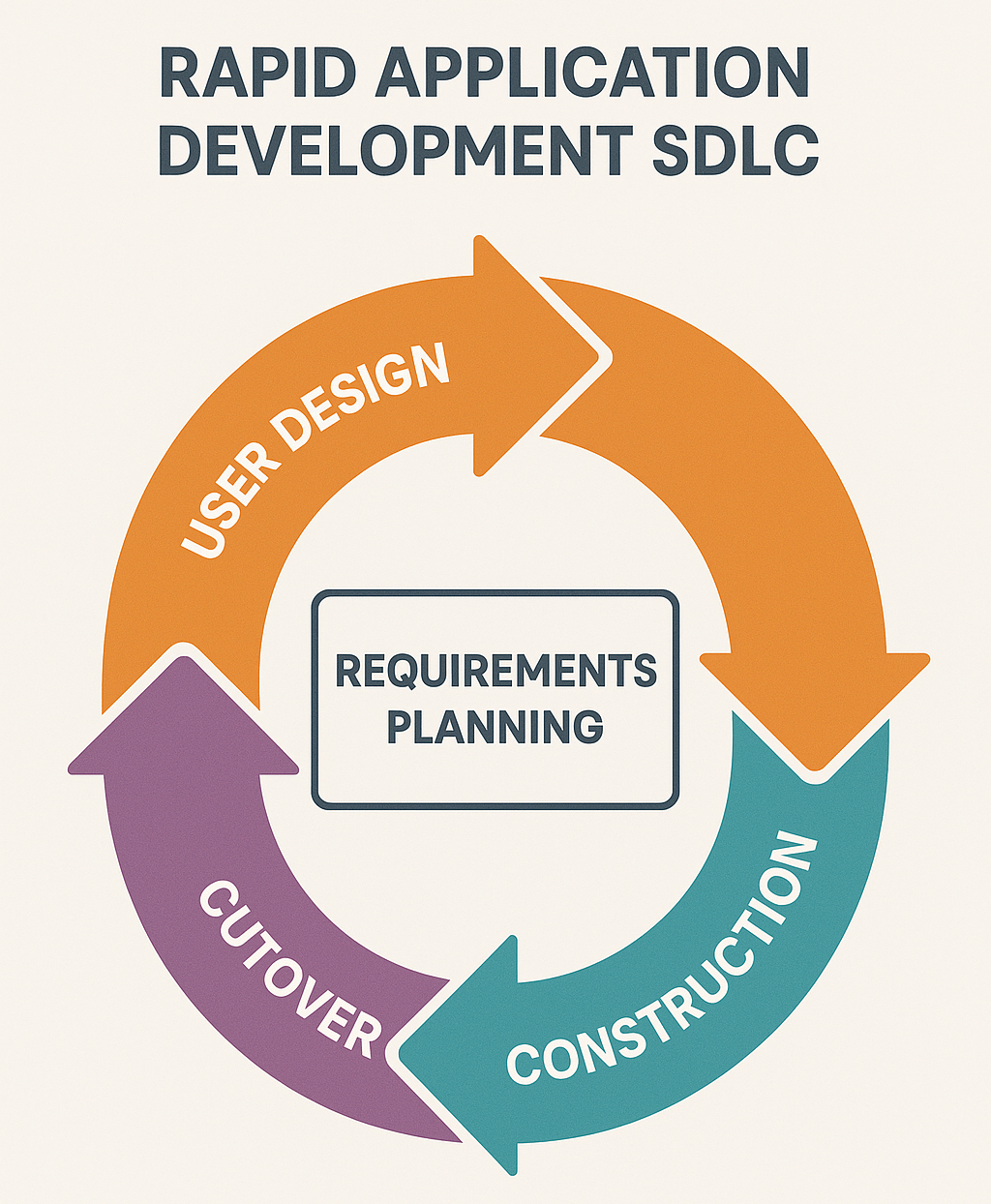
- The Rapid Application Development (RAD) model is a fast-paced software development approach that focuses on quickly building prototypes and getting feedback from users early and often. The idea is to create working versions of the software quickly, make improvements based on user feedback, and repeat the process until the final product is ready.
Phases of the RAD Model
Requirement Planning
-
Goal: Figure out the basic idea of what the software needs to do.
-
The development team and users meet to understand what the software should accomplish. This is done quickly, and details can be changed later as needed.
User Design (Prototyping)
-
Goal: Create rough versions of the software for users to test.
-
The team builds prototypes, simple versions of the software, that users can play around with. Users give feedback on what they like and what they want changed.
-
This step repeats several times, so the software gets better with each round of feedback.
Rapid Construction
-
Goal: Build the real software based on the feedback.
-
Developers take the feedback from the prototypes and start building the actual system. The team keeps coding, testing, and making adjustments as they go.
Cutover (Implementation)
-
Goal: Launch the finished product.
-
After all the coding and testing is done, the final product is ready for users. The team makes sure it works properly, moves any old data if needed, and trains users on how to use it.
Key Characteristics of RAD
-
Faster development: You get a working product faster because you start building early.
-
User feedback: Users help shape the software, so it’s more likely to meet their needs.
-
Flexible: Changes can be made anytime without slowing down the project.
-
Needs active user involvement: Users need to give regular feedback.
-
Not for big projects: It works best for smaller projects where quick changes can be made. In short, RAD is great when you want to develop software quickly, get users involved early, and adapt based on their feedback as you go.