Software Testing Life Cycle (STLC)
- The Software Testing Life Cycle (STLC) is the process of testing software to ensure that it meets the requirements and is free of bugs. It includes several phases that ensure software quality.
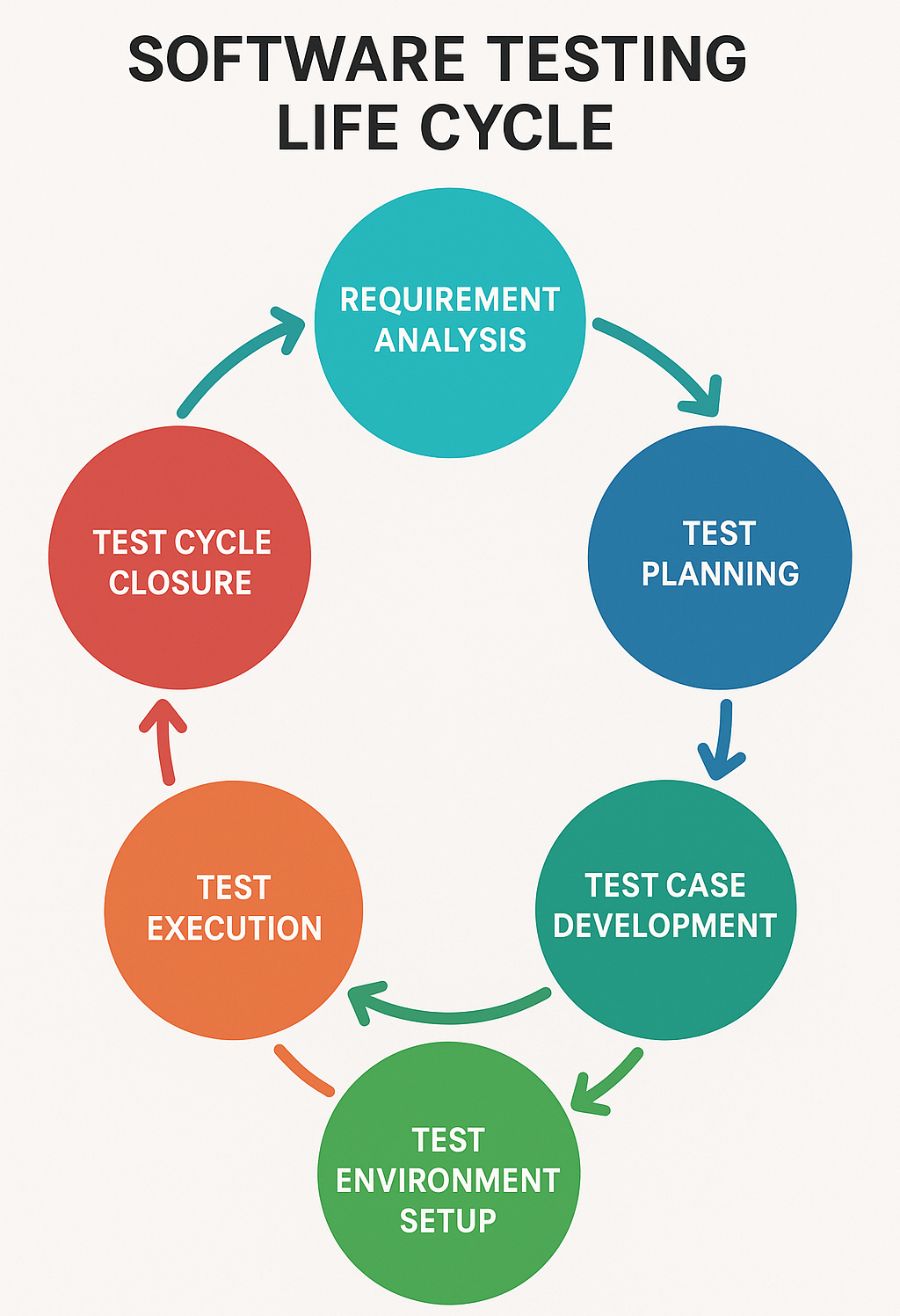
STLC phases with examples
- Requirement Analysis
- Example
- Output
- Understand what the software is supposed to do.
- The testing team analyzes the requirement document to understand the features of a new e-commerce website. They need to know how the "Add to Cart" feature should work.
- A list of things to be tested.
- Test Planning
- Example
- Output
- Plan the testing strategy, tools, and resources.
- The team decides to use Selenium for automated testing and plans how many testers are needed for both manual and automated testing.
- A test plan document that outlines the approach and resources.
- Test Case Development
- Example
- Output
- Write detailed test cases to check if the software works as expected.
For the "Add to Cart" feature, they write test cases like:
Can users add items to the cart?
Does the cart show the correct total?
- A set of test cases and test data.
- Environment Setup
- Example
- Output
- Prepare the environment where the tests will be executed.
- The testing team sets up a test server with the necessary software and databases that mimic the production environment.
- Test environment ready for testing.
- Test Execution
- Example
- Output
- Run the test cases on the software.
- The team runs manual and automated tests to check the "Add to Cart" feature. They find that the cart does not update correctly when adding multiple items.
- Test results and bug reports.
- Test Cycle Closure
- Example
- Output
- Evaluate the test cycle, check if all planned tests were executed, and analyze results.
- After fixing bugs, the team confirms that the "Add to Cart" feature works as expected. They also review what went well and what could be improved for future testing.
- A final report of test results and learnings for future cycles.
STLC - Requirement Analysis
- The Requirement Analysis phase is the first stage of the Software Testing Life Cycle (STLC), where the testing team analyzes the software requirements to identify what needs to be tested. The goal is to understand the functionalities, performance, and constraints of the system to develop an effective testing strategy.
- Objective
- Activities
- Deliverables
- The primary objective of the Requirement Analysis phase is to gain a thorough understanding of the functional and non-functional requirements of the software. This helps ensure that the testing team knows exactly what needs to be tested and can avoid missing any key features or scenarios.
Functional vs Non-Functional
Functional Requirements: What the system should do, such as features and functions.
Non-functional Requirements: Qualities like performance, security, and usability.
During the Requirement Analysis phase, the testing team performs various activities to ensure they have a clear understanding of what to test.
Study the Requirements: The team reviews the Software Requirement Specification (SRS) or other related documents provided by stakeholders. ie: For an online banking application, the team studies how user authentication, transaction processes, and account management should work.
Identify Testable Requirements: The team identifies requirements that can be tested. Non-testable requirements (like complex algorithms) may need special tools. ie: Testing login functionality or transfer limits are testable, but encryption algorithms may require specialized testing methods.
Involve Stakeholders: Engage with business analysts, developers, and clients to clarify any doubts or ambiguous requirements. ie: Clarifying how error messages should appear if a transaction fails.
Prioritize Requirements: The team prioritizes critical or high-risk features that require more focus during testing. ie: In a healthcare app, the team prioritizes testing the patient data retrieval feature as it's critical for patient safety.
Prepare Traceability Matrix: A requirement traceability matrix (RTM) is created to ensure that all requirements are covered in the test cases. ie: For every login scenario in the SRS, there's a corresponding test case in the RTM.
The outputs or deliverables of this phase ensure the testing process is aligned with the software’s requirements.
Requirement Clarification Document: A document listing any clarified or updated requirements based on discussions with stakeholders.
Testable and Non-Testable Requirements: A clear classification of the requirements, noting which ones are suitable for testing and which ones need further analysis.
Requirement Traceability Matrix (RTM): A matrix that maps each requirement to one or more test cases, ensuring that no requirement is missed during the testing phase.
Automation Feasibility Report: If automation is part of the plan, this report outlines which test cases or features can be automated.
Test Plan Input: The insights gathered here form the input for the Test Planning phase, guiding the overall testing strategy.
STLC - Test Planning
- The Test Planning phase is the second step in the Software Testing Life Cycle (STLC), where the overall testing strategy is defined. The goal is to create a plan that guides the testing process, outlines resources, timelines, and risks, and provides clarity on how testing will be conducted.
- Objective
- Activities
- Deliverable
Define the scope of testing.
Identify the resources (people, tools, and environments) required for testing.
Determine the timeline and schedule for test activities.
Plan the budget and allocate necessary tools and resources.
Identify risks and mitigation strategies.
Prepare a detailed plan that serves as a guide throughout the testing process.
The Test Planning phase involves various activities that ensure the testing process is well-structured and organized. These activities are often led by a Test Manager or Test Lead.
Define Testing Scope - Identify the components and features of the application that will be tested. ie: For an e-commerce system, the scope includes testing the user login, product browsing, payment processing, etc.
Identify Testing Types - Define the types of testing that will be performed, such as functional testing, regression testing, performance testing, security testing, etc. ie: For the same e-commerce system, functional testing will be conducted on cart management, while performance testing will be conducted on the payment gateway.
Resource Planning - Identify the resources needed, including the testing team (testers, automation engineers), testing tools, and the environment. ie: You need 3 manual testers, 2 automation engineers, and tools like Selenium for automation and JIRA for test management.
Define Roles and Responsibilities - Assign roles and responsibilities to team members based on their expertise and the project's requirements. ie: One tester will focus on functional testing, another on automation, and a third on performance testing.
Create a Test Schedule - Develop a detailed timeline for test execution, including when test cases will be written, executed, and when different phases of testing will occur ie:Unit Testing, Integration Testing, System Testing. ie: Test case development starts on October 1st, and test execution begins on October 15th.
Risk Analysis and Mitigation - Identify possible risks that could impact the testing process, such as delays in software delivery, lack of resources, or critical bugs in the system. ie: A risk could be that the payment gateway integration is delayed. The mitigation strategy is to test other features first and test the payment gateway once it's integrated.
Select Tools - Identify and select tools for test automation, defect tracking, test management, and performance testing. ie: Use Selenium for test automation, JIRA for defect tracking, and JMeter for performance testing.
Define Deliverables - Outline the expected deliverables from the testing team, including test cases, test scripts, defect reports, and final test summary reports. ie: By the end of the test cycle, the team will deliver 100 functional test cases, 50 automated scripts, and a final test report.
The output of the Test Planning phase consists of several key deliverables that serve as inputs for the upcoming test execution stages.
Test Plan Document - The Test Plan document is the primary deliverable and outlines the testing strategy. It includes:
Scope of testing
Test objectives
Roles and responsibilities
Testing tools
Test schedule and milestones
Risk management plan
Testing environment setup
Effort Estimation and Resource Plan - An effort estimation document provides a detailed breakdown of the time and resources required to complete the testing process. ie: The project requires 3 manual testers for 4 weeks, each working 40 hours a week.
Risk Management Plan - This document outlines potential risks and how they will be managed. It includes:
Identified risks: Risks that may impact the testing process.
Risk mitigation strategies: Plans to reduce or eliminate the impact of risks.
Test Environment Setup Requirements - This document specifies the test environment required for testing, including hardware, software, network configurations, and tools. ie: The environment should include a web server, database, and payment gateway integration for end-to-end testing.
Test Schedule - A detailed schedule showing when different testing activities will be performed and when milestones (such as test case design, execution, and defect reporting) will be completed.
Tool Selection Report - A list of tools selected for automation, defect management, and performance testing, along with justification for each tool’s selection.
STLC - Test Case Development
- STLC (Software Testing Life Cycle) is a process followed during software testing to ensure high-quality software by systematically organizing testing activities. Test Case Development is one of the key phases in this cycle. A detailed breakdown of the objectives, activities, and deliverables of Test Case Development is provided below:
- Objectives
- Activities
- Deliverables
Ensure Coverage: The primary objective is to create test cases that cover all functional and non-functional aspects of the application. This ensures that every feature and scenario is tested.
Identify Gaps: Test case development helps in identifying any potential gaps in the requirements or in the testing strategy.
Facilitate Future Testing: Well-written test cases serve as documentation for future testers and provide a basis for regression testing.
Minimize Defects: By writing precise test cases, the likelihood of detecting defects during early stages is increased.
Consistency: Provide a clear and consistent method for testing the system, which can be reused for different versions of the software.
Review Requirements: Analyzing and understanding the requirements documents, such as BRD (Business Requirement Document), FRS (Functional Requirement Specification), and SRS (Software Requirement Specification).
Identify Test Scenarios: Based on the requirements, identify the testable scenarios. A scenario could represent a function, feature, or business case.
Write Test Cases: For each scenario, test cases are written detailing step-by-step actions to be performed, along with the expected outcomes. A test case typically includes:
Test Case ID
Description
Preconditions (environment setup, data setup)
Steps to be executed
Expected Result
Actual Result (filled after execution)
Postconditions (actions to reset the environment)
Prioritize Test Cases: Not all test cases are equally important. Testers need to prioritize cases based on the risk and impact on the application.
Peer Review and Sign-off: Once test cases are created, they are reviewed by peers or QA leads to ensure coverage, clarity, and completeness. Revisions may be done based on feedback.
Test Case Document: This document contains the detailed test cases, organized by functionality, module, or feature.
Contains all scenarios, test cases, and associated steps.
A proper test case repository or a test management tool (like JIRA, TestRail, etc.) is often used to store these cases.
Traceability Matrix: This document links each test case back to the corresponding requirement, ensuring complete coverage. It ensures that every requirement has been addressed through testing.
Updated Requirement Documents (if applicable): If during test case development, any ambiguities or gaps in the requirements are found, they need to be documented and shared with the development and requirements team.
Automation Scripts (if applicable): If the test cases are part of an automated testing process, the automation scripts would also be part of the deliverables.
Best Practices for Test Case Development
-
Keep it Simple and Clear: The language in the test case should be easy to understand, even for non-technical team members.
-
Reuse Test Cases: Whenever possible, create reusable test cases that can be used for similar functionalities or future testing cycles.
-
Modular Approach: Break down complex test cases into smaller, more manageable ones. This improves maintainability and understanding.
-
Review Regularly: Continuous review and updates are crucial, especially when requirements change.
STLC - Test Environment Setup
- In the Software Testing Life Cycle (STLC), the Test Environment Setup is a crucial phase, ensuring the system's environment is ready for testing. In essence, the Test Environment Setup phase is focused on creating a reliable foundation to support efficient and effective test execution later in the STLC.
- Objectives
- Activities
- Deliverables
Prepare a Stable Environment: Ensure a stable and realistic environment that closely mimics the production environment.
Set Up Hardware and Software Configurations: Identify and configure the required hardware, software, network, and other necessary resources for testing.
Ensure Environment Compatibility: Make sure the environment supports the application under test (AUT) and the testing tools being used.
Enable Effective Test Execution: Ensure all dependencies, including databases, APIs, third-party services, and configurations, are set up and operational to support smooth test execution.
Requirement Analysis: Identify the required hardware, software, and network configurations based on the test plan and project requirements.
Environment Configuration: Configure the server, databases, middleware, and other resources, including operating systems, browsers, or mobile devices as applicable.
Test Data Setup: Prepare test data, including scripts, files, and databases, which will be used during the test execution phase.
Integration with CI / CD: Set up the environment to be compatible with Continuous Integration / Continuous Deployment pipelines if automated testing is involved.
Install and Configure Testing Tools: Install and configure automated testing tools, test management tools, or any other necessary software. ie: Selenium and JIRA.
Smoke Testing: Perform smoke testing to validate that the test environment is functioning properly before actual testing begins.
Backup and Restore Procedures: Ensure proper backup and restoration procedures for the test environment in case of failures or issues.
Test Environment Setup Document: A detailed document describing the configurations, versions, tools, and dependencies set up for testing.
Access Credentials: Provision of access credentials and permissions for testers and other stakeholders to access the environment.
Test Data: Prepared and validated test data, ensuring it’s ready for use in test execution.
Environment Validation Report: A report that ensures all components of the environment are working as expected after configuration (including results from smoke testing).
Issue Logs (if any): A log of issues or risks encountered during the setup phase and their resolution strategies.
STLC - Test Execution
- In the Software Testing Life Cycle (STLC), the Test Execution phase involves the actual running of test cases to validate the functionality of the software. This phase aims to identify defects and ensure the system behaves as expected. The Test Execution phase is critical in ensuring that the software is functioning as intended and is free from major defects before moving to the next stage in the development process.
- Objectives
- Activities
- Deliverables
Verify Software Functionality: Execute test cases to validate that the software meets the specified requirements.
Detect and Log Defects: Identify defects or deviations from expected behavior and log them for correction.
Ensure Software Quality: Confirm the software performs correctly under different scenarios, both functional and non-functional.
Track Testing Progress: Monitor test case execution to track progress and ensure testing is moving according to the plan.
Test Case Execution: Execute the prepared test cases manually or using automated scripts. Ensure each test case is executed under the specified conditions.
Logging Defects: If a test case fails, log the defect with all necessary details, such as steps to reproduce, screenshots, and logs, into the defect tracking system.
Re-testing: Once defects are fixed, retest the specific functionality to ensure the defect is resolved. Regression Testing: Execute regression tests to ensure that the defect fixes have not introduced any new issues in the previously working functionality.
Test Status Reporting: Provide regular updates on the test execution progress, such as test cases passed, failed, or blocked.
Updating Test Cases: In case of modifications in the application, update the test cases if necessary, and re-execute them.
Bug Triage Meetings: Participate in regular meetings with developers and project managers to prioritize and discuss open defects and their resolutions.
Executed Test Cases: A record of all the executed test cases with their respective statuses (pass, fail, or blocked).
Defect Reports: Detailed defect reports logged in a defect management tool, including severity, priority, and steps to reproduce.
Test Execution Report: A consolidated report summarizing the test execution activities, including metrics such as the number of test cases passed, failed, defects found, and critical issues.
Re-testing and Regression Test Reports: Reports documenting the outcomes of re-testing and regression testing efforts, indicating whether the defects are successfully resolved without impacting other parts of the system.
Traceability Matrix: A document ensuring all requirements have corresponding test cases and validating that all functionalities have been tested.
Final Test Summary Report: A high-level overview of the test execution phase, highlighting key observations, risks, defects, and the overall readiness of the system for production.
STLC - Test Cycle Closure
-
In the Software Testing Life Cycle (STLC), the Test Cycle Closure phase is the final stage. It involves reviewing the entire testing process, analyzing test results, assessing test coverage, and providing a summary of testing efforts to ensure all testing objectives have been met. This phase also helps identify lessons learned for future projects.
-
The Test Cycle Closure phase ensures that all testing activities are formally completed, and it provides valuable insights for improving future testing cycles. This phase helps the team assess the overall quality of the software and decide whether it is ready for release.
- Objectives
- Activities
- Deliverables
Evaluate Test Completion Criteria: Confirm that all planned testing activities have been completed and objectives have been met.
Analyze Test Metrics and Coverage: Review test execution data to evaluate the effectiveness and efficiency of the testing process.
Document Lessons Learned: Capture insights from the testing process to improve future testing efforts.
Assess Software Quality: Provide an overall assessment of the software’s quality and readiness for release.
Finalize Test Deliverables: Ensure that all test-related deliverables, such as test reports and defect logs, are completed and archived.
Plan Future Improvements: Identify areas for improvement in testing methods, processes, or tools for future cycles.
Test Case and Defect Review: Review executed test cases, identify any test cases that were skipped or blocked, and evaluate the status of all logged defects.
Analyze Test Coverage: Review the test coverage to ensure that all requirements have been adequately tested. This can include a review of the traceability matrix.
Evaluate Test Metrics: Analyze key metrics such as defect density, test case pass / fail rates, defect resolution time, and test execution progress.
Test Closure Meetings: Conduct meetings with the testing team, developers, and other stakeholders to discuss the testing process, results, and any challenges faced during the cycle.
Document Lessons Learned: Document insights from the testing process, including what went well and areas where improvements are needed for future projects.
Final Test Report Preparation: Prepare the final test summary report that highlights key testing outcomes, defects, risks, and overall software quality.
Sign-off and Archiving: Obtain formal sign-off from stakeholders and archive test artifacts, reports, and documentation for future reference.
Test Summary Report: A comprehensive report detailing test execution, defect trends, test coverage, key metrics, and overall assessment of the testing process.
Test Metrics Report: A report that includes various test-related metrics, such as defect density, test case execution statistics, and defect closure rates.
Defect Report: A final status report on all defects logged during the testing cycle, including their severity, priority, and resolution status.
Test Closure Report: A formal report indicating the completion of testing activities, summarizing test results, and stating whether the software is ready for release.
Lessons Learned Document: A document capturing best practices, challenges, and areas for improvement that can be applied to future projects.
Archived Test Artifacts: All test cases, scripts, logs, reports, and other relevant documentation are archived for future reference or audits.
STLC - Key Considerations
In the Software Testing Life Cycle (STLC), key considerations ensure the testing process is thorough, efficient, and adaptable by using the following concepts:
Defect Management
- Definition
- Key Considerations
- Impact on STLC
- Defect management is the process of identifying, documenting, and tracking defects (bugs) throughout the testing life cycle.
Defect Life Cycle: Establish a clear defect lifecycle from discovery to resolution, including stages such as New, Open, In Progress, Resolved, Verified, and Closed.
Severity and Priority: Define severity (impact on the system) and priority (urgency of fixing the defect) to help the team address critical issues first.
Defect Tracking Tools: Use tools like JIRA, Bugzilla, or Azure DevOps to log, track, and report defects.
Collaboration: Effective communication between testers, developers, and stakeholders to ensure defects are well-understood and resolved efficiently.
Root Cause Analysis: Conduct root cause analysis for major defects to prevent similar issues from occurring in future releases
- Defect management helps maintain the quality of the application, ensures proper documentation, and minimizes the risk of recurring issues.
Test Automation
- Definition
- Key Considerations
- Impact on STLC
- Test automation involves using tools and scripts to automate repetitive testing tasks, enhancing efficiency and coverage.
Suitability: Determine which tests are suitable for automation, such as regression, smoke, and performance tests. Not all tests, especially exploratory or ad hoc tests, can be automated effectively.
Tool Selection: Choose appropriate automation tools that align with the project’s technology stack and requirements. ie: Selenium, Appium, and TestComplete.
Automation Framework: Implement a robust automation framework to maintain and scale the automation scripts. ie: Keyword-Driven, Data-Driven, or Hybrid.
Maintenance: Plan for the maintenance of automation scripts as the application evolves. Regular updates to the scripts are crucial to adapt to UI and functionality changes.
Return on Investment (ROI): Ensure automation delivers tangible benefits like faster execution, reduced manual effort, and better coverage.
- Test automation improves testing efficiency, especially during regression testing. It helps speed up repetitive tasks, but requires careful planning and maintenance.
Performance Testing
- Definition
- Key Considerations
- Impact on STLC
- Performance testing ensures that the application can handle expected and peak loads without performance degradation.
Types of Performance Testing:
Load Testing: Test the application under expected load conditions to ensure stable performance.
Stress Testing: Test the application under extreme conditions to identify the breaking point.
Scalability Testing: Ensure the application can scale effectively with increasing load.
Tools and Frameworks: Use appropriate performance testing tools like JMeter, LoadRunner, or Gatling.
Performance Metrics: Focus on key metrics like response time, throughput, resource utilization (CPU, memory), and error rates.
Test Environment: Ensure that the test environment mimics production as closely as possible to get accurate performance insights.
Bottleneck Identification: Identify bottlenecks, such as slow queries, inefficient code, or inadequate infrastructure, and provide detailed reports to the development team for optimization.
- Performance testing helps ensure that the application meets performance requirements under normal and peak loads, and it prevents crashes or slowdowns in production.
Security Testing
- Definition
- Key Considerations
- Impact on STLC
- Security testing focuses on identifying vulnerabilities in the application and ensuring it is protected against malicious threats.
Types of Security Testing:
Vulnerability Scanning: Scan the application for known security vulnerabilities.
Penetration Testing: Simulate attacks to discover security weaknesses.
Risk Assessment: Identify and prioritize potential security risks based on impact and likelihood.
Security Auditing: Evaluate the application’s compliance with security policies and standards.
Common Vulnerabilities: Focus on key vulnerabilities like SQL injection, cross-site scripting (XSS), cross-site request forgery (CSRF), and broken authentication.
Tools: Utilize security testing tools like OWASP ZAP, Burp Suite, or Veracode.
Compliance: Ensure the application complies with industry security standards like OWASP, ISO, or GDPR (General Data Protection Regulation).
Security Patching: Plan for the regular update of software libraries and components to close security loopholes.
- Security testing safeguards the application from potential attacks and ensures that sensitive data is protected, reducing the risk of breaches.
Continuous Improvement
- Definition
- Key Considerations
- Impact on STLC
- Continuous improvement focuses on evolving the testing process to increase efficiency, quality, and effectiveness in future cycles.
Retrospective Analysis: Conduct regular retrospectives after each testing cycle to assess what worked and what didn’t. Gather feedback from team members to identify areas for improvement.
Test Metrics Review: Analyze metrics like defect density, test coverage, and defect leakage to track the effectiveness of the testing process and identify areas for improvement.
Process Optimization: Continuously optimize test processes, such as test case design, execution, and reporting, to streamline operations and eliminate bottlenecks.
Tool Enhancement: Continuously evaluate the tools being used to ensure they are still the best fit for the project. Consider upgrading or switching tools if necessary. ie: Test management, Automation, and Performance testing.
Skill Development: Invest in upskilling the team by providing training on new tools, technologies, and testing methodologies to keep up with industry trends.
Feedback Loop: Foster a culture of continuous feedback between testers, developers, and stakeholders to improve the overall software development and testing process.
- Continuous improvement ensures that the testing process evolves over time, leading to better quality software, more efficient workflows, and enhanced collaboration across teams.