Agile
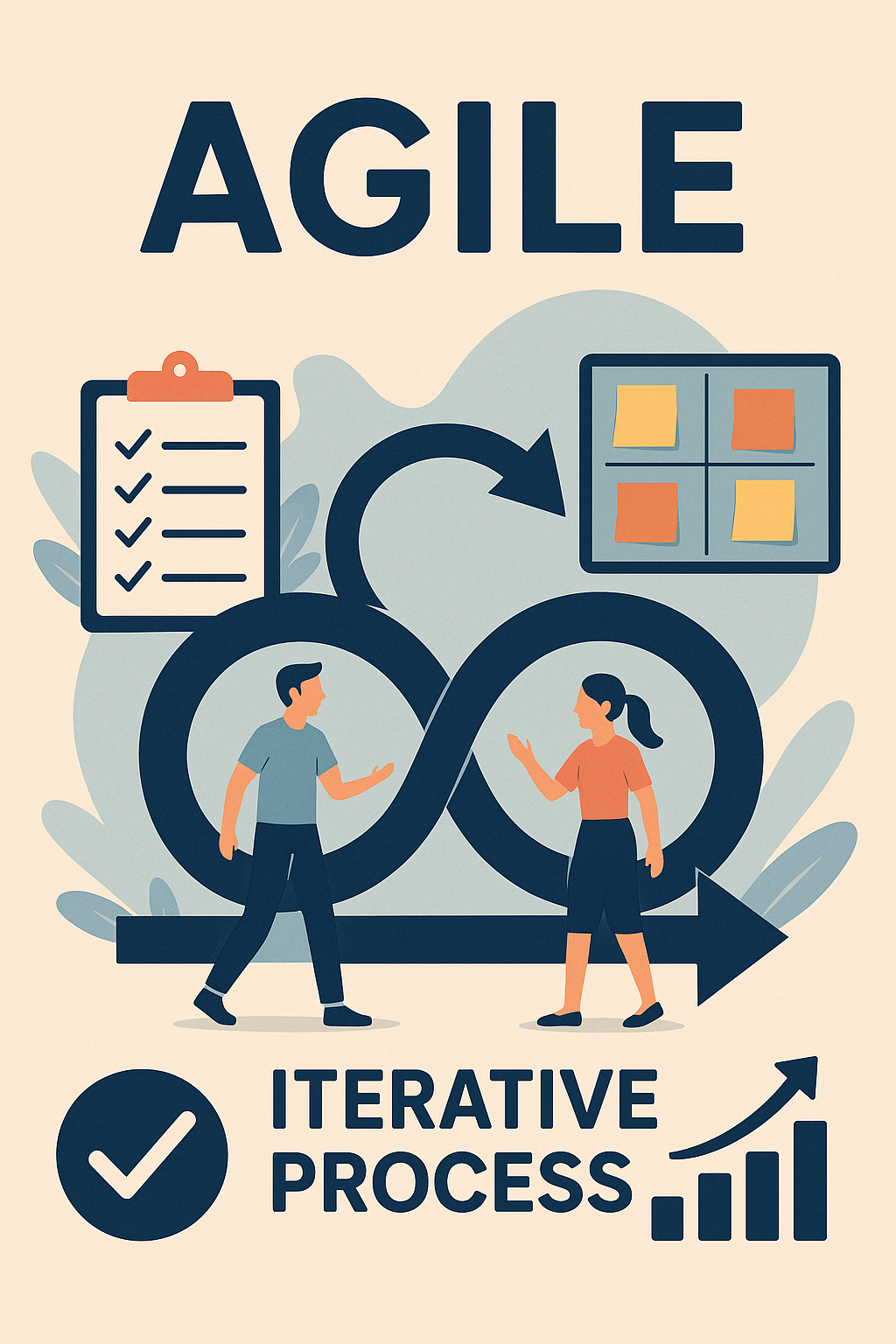
- Agile is a mindset and approach to software development (and other fields) that emphasizes flexibility, collaboration, and customer satisfaction. Unlike traditional methods, Agile promotes iterative development, frequent feedback, and the ability to adapt to changing requirements. Agile helps teams deliver high-quality software quickly and efficiently. Agile is widely adopted in modern software development because of its ability to handle complexity and deliver value in fast-paced, uncertain environments.
The Agile Manifesto
-
The Agile Manifesto was introduced in 2001 by a group of software developers and outlines the core values and guiding principles of Agile development. The manifesto includes:
-
Core Values:
-
Individuals and interactions over processes and tools - Agile values collaboration and communication among team members and stakeholders more than following rigid processes or relying on specific tools.
-
Working software over comprehensive documentation - While documentation is important, Agile prioritizes delivering working software as the main measure of progress.
-
Customer collaboration over contract negotiation - Agile encourages ongoing collaboration with customers and stakeholders rather than sticking strictly to contractual obligations.
-
Responding to change over following a plan - Agile embraces changes, even late in development, and adapts plans based on feedback and evolving needs.
-
12 Agile Principles
-
Customer satisfaction through early and continuous delivery of valuable software - Deliver working software frequently, with the highest priority being to satisfy the customer.
-
Welcome changing requirements, even late in development - Agile is flexible and adapts to changing needs and priorities.
-
Deliver working software frequently, with a preference for shorter timescales - Agile encourages delivering small, functional increments of the software regularly. ie: Every 1 - 4 weeks.
-
Business people and developers must work together daily throughout the project - Continuous collaboration between the business side and the technical team is key to ensuring that the product meets expectations.
-
Build projects around motivated individuals - Trust and empower self-organizing teams to get the work done without micromanagement.
-
The most efficient and effective method of conveying information is face-to-face conversation - While remote work and tools are common, Agile favors real-time, direct communication over written messages to improve clarity and problem-solving.
-
Working software is the primary measure of progress - The success of the project is measured by delivering working software, not by following strict processes or hitting deadlines.
-
Agile processes promote sustainable development - Teams should maintain a consistent pace that allows them to work productively without burning out.
-
Continuous attention to technical excellence and good design - Agile encourages good technical practices, ensuring that the product is of high quality, maintainable, and scalable.
-
Simplicity the art of maximizing the amount of work not done is essential - Focus on delivering the essentials and avoid overcomplicating the product.
-
Self-organizing teams produce the best architectures, requirements, and designs - Agile teams are cross-functional and empowered to make decisions and solve problems themselves.
-
Regular reflection on how to become more effective, and adjusting accordingly - After each iteration, Agile teams reflect on their performance and seek ways to improve.
Agile Practices
- To implement Agile principles, teams use various practices that support the iterative and incremental nature of the Agile approach.
Iterative Development
- The project is broken into small, manageable units (iterations or sprints), each delivering a portion of the overall functionality. At the end of each iteration, the team presents working software and gathers feedback from stakeholders.
Backlog Management
- The product backlog is a prioritized list of features, bug fixes, technical tasks, and improvements needed for the project. It is constantly updated as requirements evolve. The sprint backlog is a list of tasks selected for a particular iteration.
User Stories
- Instead of lengthy requirement documents, Agile teams use user stories to capture features from the user's perspective. A user story typically follows the format: As a user, I want feature so that benefit.
User Stories Sample
User stories in Agile help capture requirements from the user's perspective. They are simple, structured descriptions that focus on the value or benefit to the user. Here are a few example user stories for different scenarios:
E-commerce Website (Shopping Cart Feature)
-
As a shopper, I want to add items to my shopping cart so that I can review them before purchasing.
-
As a shopper, I want to apply discount codes at checkout so that I can save money on my purchases.
-
As a guest user, I want to check out without creating an account so that I can complete my purchase quickly.
Banking Application (Mobile Banking)
-
As a user, I want to view my account balance on my mobile app so that I can track my spending easily.
-
As a user, I want to transfer money between my accounts so that I can manage my funds efficiently.
-
As a user, I want to receive notifications when my account balance is low so that I can avoid overdraft fees.
Social Media Platform (Profile and Posts)
-
As a user, I want to update my profile picture so that I can personalize my profile.
-
As a user, I want to comment on other users’ posts so that I can engage with the community.
-
As a user, I want to control who can see my posts so that I can protect my privacy.
Healthcare System (Patient Portal)
-
As a patient, I want to schedule appointments with my doctor online so that I can avoid phone calls.
-
As a patient, I want to view my medical test results so that I can stay informed about my health.
-
As a patient, I want to receive reminders for my upcoming appointments so that I don’t miss them.
Learning Management System (LMS)
-
As a student, I want to submit assignments online so that I can complete my coursework remotely.
-
As a teacher, I want to grade assignments digitally so that I can provide feedback to students quickly.
-
As a student, I want to track my progress in each course so that I can understand my performance.
Format Breakdown
Each story typically follows this format:
As a Type of user, I want Some goal so that Reason / Benefit.
-
Type of user - Defines the user, such as "shopper," "patient," "student," or "admin."
-
Some goal - Describe what the user wants to do.
-
Reason/Benefit - Explains the value or benefit the user will get from achieving the goal.
User stories are kept concise, but they can be accompanied by acceptance criteria to specify how the functionality should work, ensuring clarity and shared understanding among the team.
Continuous Integration (CI)
- Agile encourages frequent integration of code into a shared repository. This ensures that new features or changes are regularly tested and integrated with the existing system to avoid integration issues later.
Test-Driven Development (TDD)
- Developers write tests before writing the code. This ensures that each piece of code is thoroughly tested and works as expected before being integrated.
Daily Standups (Daily Scrum)
- A short daily meeting where team members briefly discuss what they did the previous day, what they plan to do today, and any obstacles they are facing. This keeps everyone aligned and helps resolve issues quickly.
Retrospectives
- At the end of each iteration, the team holds a retrospective meeting to reflect on what went well, what didn’t, and what can be improved for the next iteration.
Pair Programming
- Two developers work together at one workstation. One writes the code while the other reviews it in real-time. This practice helps catch mistakes early and encourages knowledge sharing.
Burndown Charts
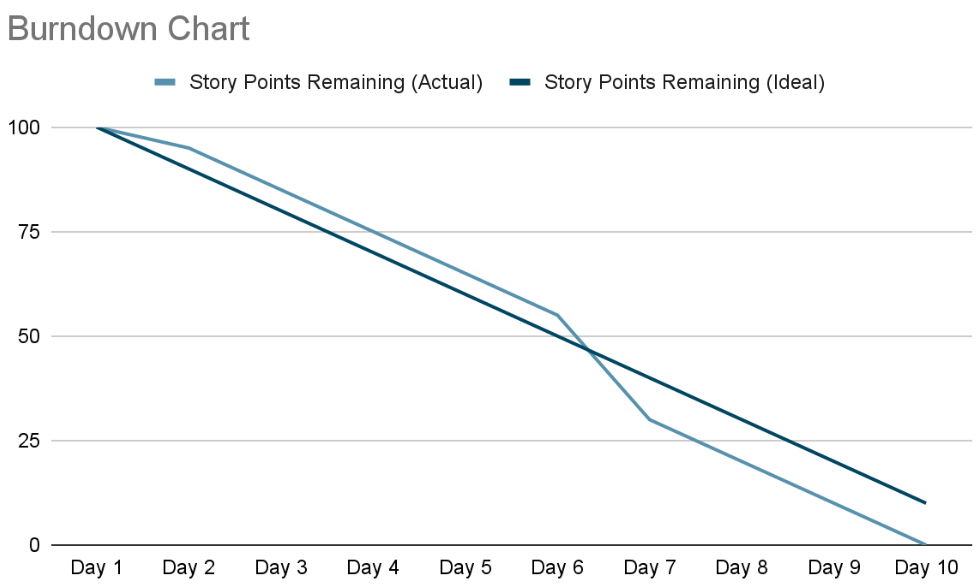
- A visual tool used to track progress within a sprint. It shows the amount of work remaining versus time, helping the team understand if they are on track to meet their goals.
Burndown Chart Sample
A Burndown Chart is a graphical representation of work left to do versus time. It helps teams track progress during a sprint or project by showing how much work remains and if the team is on pace to complete the tasks by the deadline.
Example Scenario for a Burndown Chart
Let's assume we have a 10-day sprint with a total of 100 story points (work items). The team needs to complete the 100 story points by the end of the sprint.
Key Components of a Burndown Chart:
-
X-axis - Represents time. ie: Sprint Days or Weeks.
-
Y-axis - Represents the amount of work remaining. ie: Story points, tasks, and hours.
-
Ideal Burndown Line - A diagonal line representing how work should ideally be completed over time.
-
Actual Work Line - A line showing how much work has actually been completed each day.
Kanban
- A visual system for managing work as it moves through various stages. Teams use a Kanban board to visualize tasks, typically represented as cards, which move across columns representing stages like "To Do," "In Progress," and "Done.”
Kanban Sample
A Kanban board typically consists of columns that represent different stages of work, such as To Do, In Progress, and Done. Tasks are represented as cards that move across the columns as they progress.
| To Do | In Progress | Done |
|---|---|---|
| Task 1: Design homepage layout | Task 3: Write unit tests for API | Task 6: Review accessibility compliance |
| Task 2: Develop login functionality | Task 4: Create user profile page | Task 7: Add social media integration |
| Task 5: Set up database schema | Task 8: Fix footer alignment issue |
Explanation:
-
To Do - Tasks that have been identified but not yet started.
- Example - "Design homepage layout," "Write unit tests for API," and "Add social media integration."
-
In Progress - Tasks that are currently being worked on.
- Example - "Develop login functionality" and "Create user profile page."
-
Done - Tasks that are completed.
- Example - "Set up database schema," "Review accessibility compliance," and "Fix footer alignment issue."
Kanban Practices:
-
Limit Work in Progress (WIP) - To ensure efficiency, there may be a limit on how many tasks can be in the "In Progress" column at any time. For example, no more than 3 tasks in progress at once.
-
Continuous Flow - Work items move across the board from "To Do" to "Done" in a continuous flow. When a task is completed, a new one can be picked up from the "To Do" column.
Benefits of Agile
-
Faster delivery of valuable features.
-
Improved collaboration between teams and stakeholders.
-
Higher quality products due to continuous testing and integration.
-
Increased flexibility to adapt to changing requirements.
-
Customer satisfaction due to regular feedback and updates.